News:

Create A Forum Installed

Show Posts

This section allows you to view all posts made by this member. Note that you can only see posts made in areas you currently have access to.

Messages - RedRyder1

Pages: [1]
1
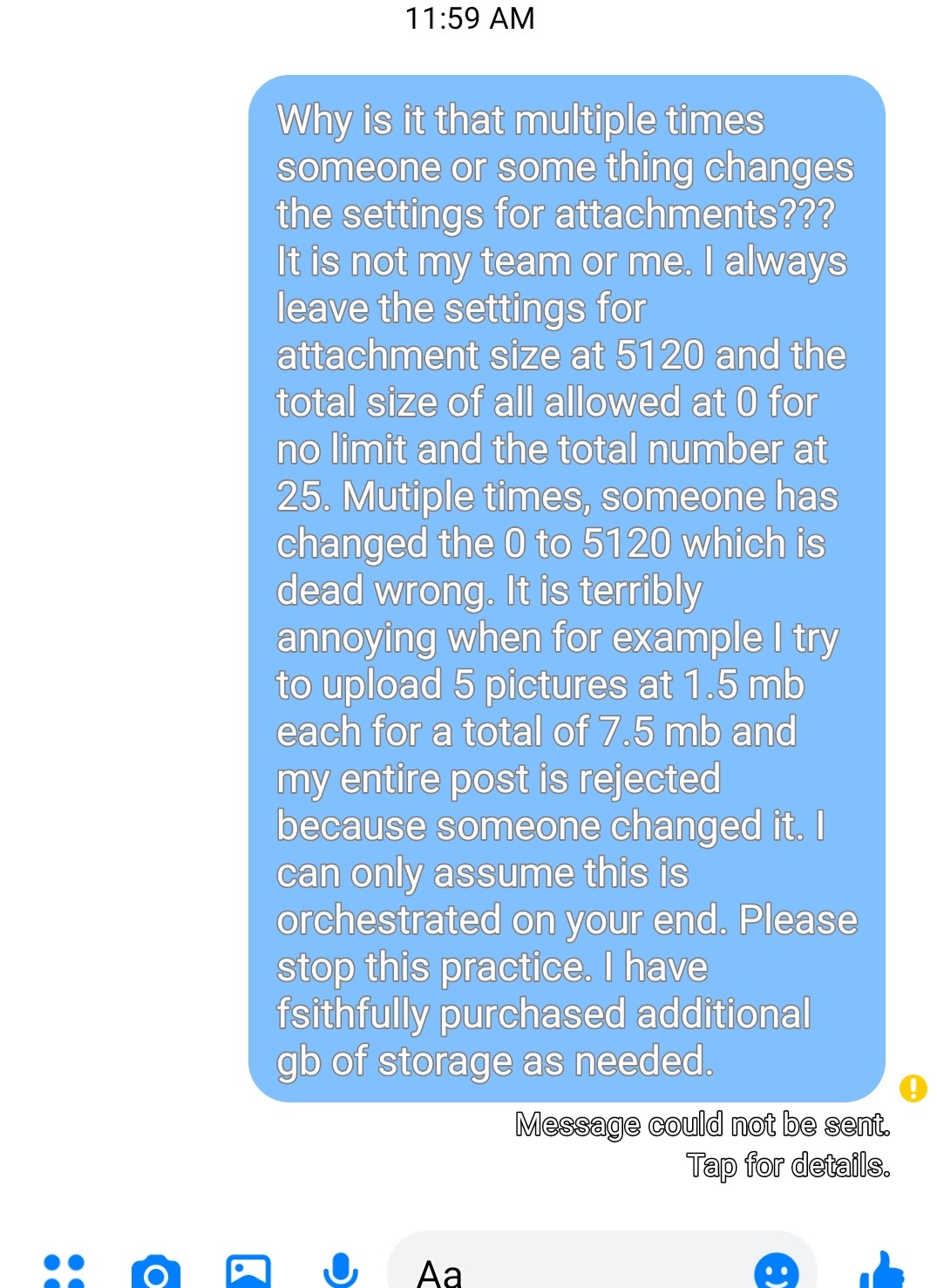
This happens occasionally and is quite annoying.
It has happened sporadically over the last couple years.

Please read the attachment as I don't have time to re-type what I put into Facebook messenger that was rejected due to Create A Forum not accepting messages anymore.


Thank you in advance,

Gil

2
General Support / Re: Problem for forum members posting photos
« on: July 30, 2019, 12:24:03 pm »
In addition... Could you please shed some light on this: ,watt," />   

It has appeared in the top left of our index page in the dark blue bar at the top.
See pictures attached.

Who put it there?
Why is it there?
What is it?

Thank you.

Gil   www.officeofsteamforum.com


Fixed. Do not add any html tags to your meta description tag.  You had <meta name="google-site-verification" content="v8g1RZGJ0RxdDHYwHZOuf1lMakw_kTE4CgU44D8XykI" /> in there which caused that issue. That goes in the meta tags section. But you already have it there.


I don't understand. I added the google site verification a while back and that just appeared in the last day or two.
Google requires that in the header for verification that I own the site so I can post a live link to our forum at the end of my videos.


Hopefully they won't require it to stay there.
I do not see the word watt  ,watt," /> in any of the google verification you have showed us.

Regards,
Gil

3
General Support / Re: Problem for forum members posting photos
« on: July 30, 2019, 11:06:32 am »
In addition... Could you please shed some light on this: ,watt," />   

It has appeared in the top left of our index page in the dark blue bar at the top.
See pictures attached.

Who put it there?
Why is it there?
What is it?

Thank you.

Gil   www.officeofsteamforum.com


4
General Support / Re: Problem for forum members posting photos
« on: July 30, 2019, 10:59:27 am »
There should be no difference between admin and a regular member when posting.


True but there is clearly a difference in this case.


Also, her photo selection bar is longer and the select button is on the right and not the left and you can't make it provide an inline full sized image.


Is a personal setting change required or similar?

5
General Support / Re: Problem for forum members posting photos
« on: July 29, 2019, 11:58:10 am »
I find that I can now load multiple full sized images.
I tested with 6 of them.


This seems to work only with my admin privileges.


It will not work for a regular member as far as I can see.

My wife's attempt:
Here:
https://www.officeofsteamforum.com/collections-pictures/picture-loading-test/


6
General Support / Re: Problem for forum members posting photos
« on: July 25, 2019, 08:55:04 pm »
Just tried again on my PC.


NO GO again.


This is making things really difficult for us.


Gil   RedRyder  www.officeofsteamforum.com


7
General Support / Re: Problem for forum members posting photos
« on: July 25, 2019, 03:15:45 pm »
Try again. I just changed another server limit.


Just tried from my phone.

It's a NO GO.

Got this error:
This site can’t be reached The webpage at https://www.officeofsteamforum.com/index.php?action=post2;start=45;board=20 might be temporarily down or it may have moved permanently to a new web address.
ERR_FAILED

8
General Support / Re: Problem for forum members posting photos
« on: July 25, 2019, 11:11:04 am »
Edited: duplicate post.


By the way, the address below published in the error message won't work.
>>> webmaster@createaforum.com (after RCPT TO): 550 Requested action not taken: mailbox unavailable or not local.
 

9
General Support / Re: Problem for forum members posting photos
« on: July 25, 2019, 11:08:31 am »
Made these changes.
Increased server max upload fields from 20 to 25
Increase server max upload at one time from 12mb to 50mb

Did image upload changes as noted in above theard


We are still not there.


Gil - RedRyder  -  https://www.officeofsteamforum.com/index.php


I tried loading 5 pictures,then 3 pictures and both times got this:


Internal Server ErrorThe server encountered an internal error or misconfiguration and was unable to complete your request.
Please contact the server administrator at webmaster@createaforum.com to inform them of the time this error occurred, and the actions you performed just before this error.
More information about this error may be available in the server error log.

10
General Support / Re: Problem for forum members posting photos
« on: July 25, 2019, 10:44:06 am »
We'll give it a try. Thank you!


Gil  RedRyder  www.officeofsteamforum.com


11
General Support / Re: Problem for forum members posting photos
« on: July 24, 2019, 12:28:14 pm »
Dear Createaforum admin,


re: www.officeofsteamforum.com


Please fix our photo uploading abilities.
It has never been right since I built our forum late February and early March 2019.
We need the ability to upload files up to 5 or 6 Megabytes and up to 25 attachments with no limit on total size of post or a total post limit of 50 MB. If the total post size is problematic, we could try 15 or 20 MB total post size.


Also, I don't quite understand the attachment size which looks like it changed after we set up from kb to kB or something. I increased the accepted file size from 8,192 to 51,200 because I suspected that it may be that kB equals kilobits.


Most of all.... Please let us just load inline full sized images without having to go through the convoluted method of first having to select upload for thumbnail followed immediately by selection inline full size image.


This should not be made so difficult for me and my members.
Thank you in advance.
Regards,
Gil - RedRyder  www.officeofsteamforum.com

Pages: [1]